
Metaoptics made simple
User interface conceived specifically for metaoptics using inverse design flow technique.
Faster and more accurate
Computationally efficient algorithms and built-in parallel processing deliver accurate results faster.
Design bigger metaoptics
Cloud license users have access to dynamically scalable computing resources on Amazon Web Services (AWS). For local license users, computationally efficient algorithms enable larger designs for a given computing platform.
Support from experts
PlanOpSim’s team of photonics engineers and computational physicists respond directly to support questions.
Compatibility with Ray-Tracers
PlanOpSim’s API enables trivial interfacing to your preferred ray-tracing package. PlanOpSim can also introduce 3rd party developers who are experienced in providing interface development services to PlanOpSim’s tools.
Powerful optimization methods
Metacomponent: Design of metasurfaces, metalenses, components and holograms using powerful optimization methods saving crucial time.
Use PlanOpSim’s algorithms in your design flow
All tool capabilities can be accessed via the SDK API.
Automated batch processing
Any sweeps or repeated calculations that aren’t already built-into the tool UI can be automated via scripting using the SDK API.
Built-in manufacturer PDKs
Design faster with built-in libraries and with confidence of manufacturability.
Output file formats (GDS, OAS, CSV…)
Output file formats compatible with all metaoptics manufacturers.
Cloud or Local
PlanOpSim is available via cloud or local. Cloud requires only a webbrowser. Local gets you access to specific installation support.
Multi scale simulation
Metacell: Optical design of nanostructures using a full solution of Maxwell's equations. Metacomponent: Design of metasurfaces, metalenses, components and holograms using powerful optimization methods.
FAQ
Our free trial version has no limitations and is exactly similar to the paid version, it comes with the same support training etc that paying customers receive. The free trial version is available for one month to the user after which they can modify it to the paid version if they want.
You can contact PlanOpSim directly (contact us) for a free trial version. It’s a very simple step where you need to provide very general information and you will receive the package as soon as possible. Most trials happen in our cloud version, access can be set up the same day. Therefore we recommend cloud version for trial of the software.
Each licensed user can log in and simulate from any computer but only one simulation can be run simultaneously. It is possible to work with multiple users simultaneously using multiple licensed users.
Yearly licenses come with all updates and support included. Users with a permanent license can receive updates and technical support via a maintenance package. Did you know we also do not charge additional hosting costs?
Yes, you get access to and rent the software for 3 months or 6 months as well.
Here we are describing all the ways a user can pay PlanOpsim:
- You can purchase a yearly license. No extra charge for maintenance or hosting will be included. Software updates will automatically be included without any extra cost.
- You can purchase a permanent license and then there will be no additional requirement of annual fees for maintenance, hosting, etc. Software updates are included for the first year and further updates in the following year can be purchased accordingly which is optional.
Yes, the user can operate locally if they wish for it. In that case we will provide them them with a dongle that they can use to run the application locally. For further details regarding this contact us.
All users with subscription licenses and permanent users with an active support period are entitled to software updates. For cloud users updates are automatically installed during PlanOpSim server maintenance. Local users receive an update link to download and install the latest version. Therefore we recommend the cloud version for the trial of the software.
Every user means 1 user name means 1 login from any computer but you can only run 1 simulation simultaneously. But there can be special packages for organizations and educational firms that specially require multiple users to work on our software.
You can reach out to us by following this link or email us, whenever you face any technical issues or need help with any technical questions. Our technical support team will get back to you as soon as possible. You can also contact us for further information.
Please contact us as soon as you notice that your dongle or license is missing.
Operating system
PlanOpSim can run on Windows and Linux operating systems.
For windows the following versions are required:
- Windows 11 64-bit: Home or Pro version 21H2 or higher, or Enterprise or Education version 21H2 or higher.
- Windows 10 64-bit:
- We recommend Home or Pro 22H2 (build 19045) or higher, or Enterprise or Education 22H2 (build 19045) or higher.
- Minimum required is Home or Pro 21H2 (build 19044) or higher, or Enterprise or Education 21H2 (build 19044) or higher.
- WSL version 1.1.3.0 or later.Â
System requirements:
- 64-bit processor with Second Level Address Translation (SLAT)
- 4GB system RAM
- Hardware virtualization capability (only for windows)
    
Browser:
  Any browser will work. We recommend to use either edge, chrome or firefox.
No, we implement docker and thus operating system wouldn’t be an issue for running our software locally. For further information contact us.Â
Ans: The details of simulation runtime and component dimension can be found below in range, for details contact us and we can discuss about it. Our server currently uses a 4 CPU 32 GB ram version for calculations. However, the time can differ depending on a couple of factors.
- The amount of structures used
- The number of elements to be placed (for the calculation the important part is more the number of cells (area/area of a unit cell))
- The RCWA accuracy setting used. When a response has to be calculated it will call the RCWA solver with that setting.
PlanOpSim allows scripting in two ways.
- Users can easily generate wavefront in Meta Component design through an easy-to-use python interface (the interface looks like the example picture shown below).
- Furthermore, since PlanOpSim is a cloud-first software, any action in the software can be automated via scripting through the API (using HTTP calls)
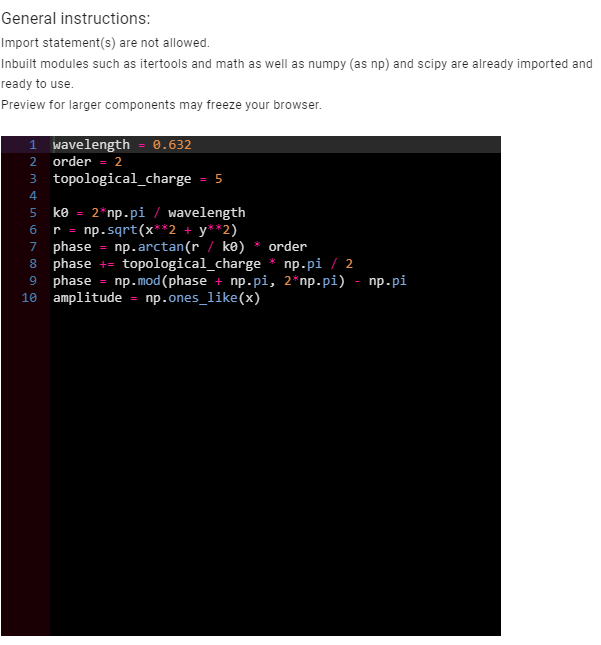
Yes. you can create meta cell group from a metacell simulation by using a CSV file. You can easily export the simulation results in a CSV file and then modify it according to your need and use it to create the meta cell library. The following has been demonstrated in the video Link.
With our parameter sweep our users can easily analyze metalens results in our user interface. You can find detailed information about how to use parameter sweep in this video.
Sharing the file by exporting the project from the source account and importing it to the destination account which is already implemented. Collaborating on the same project simultaneously – which is not possible in principle – since everything in our software is designed to have a single owner. There can be a possible implementation for collaboration by sharing the same credentials across different machines although only one job (simulation task) can be performed at once.
In our software application user interface, there is an option to select the incident light characteristics such as the beam pattern (plane wave or Gaussian) and also the direction of the beam described by the azimuth and the zenith angles.
Link to the youtube video.
We performed a test to compare the speed in a local machine and in the cloud server. The test design simulation parameters are as follows:
The reference structure uses the geometric phase (also called the Pancharatnam-Berry phase) which simultaneously converts polarization and controls the phase of the transmitted light. More details about the calculation can be found in the link below.
We have run the same calculation on the cloud using AWS and compared the calculation time to the local calculations above. On a laptop, the parameter sweep was completed in 19.3 minutes. The same calculation took only 10.65 minutes on the cloud. This represents a 45% decrease in calculation time. Keeping in mind that this test was run on a modest AWS machine. Scaling further to the most powerful cloud servers would further reduce the time vs. local calculations. PlanOpSim’s software is deployed on the cloud to have this increase of computation power in reach whenever needed. A simulation running in the cloud will also not compete with other programs and will not slow down other day-to-day work. This test was done by comparing an 8Gb core i7 laptop to the PlanOpSim cloud version. Keep in mind that the numbers for this comparison can change drastically depending on the local PC used for this. Some of our customers for instance use an in-house server that outperforms the cloud version.
The data is described Here.
PlanOpSim software uses multiscale simulation. In the Metacell module we use RCWA, in the MetaComponent model approximated methods and propagation optics are used to rapidly model large-area metasurfaces
There are a few advantages our software holds for utilizing RCWA instead of other full wave solvers such as FDTD or FEM out of which the most important is speed. The detailed analysis considering a particular design problem has been discussed in the following Article.
Our software application is mainly used in cloud based server, but we also provide services for running the application locally with particular product license key and USB drive. in others words: our solution can be air gaped, in some instances this is required by our customers and we happily assist them in setting this up for them.
You can just drag and drop files in json format for our software to read and display accordingly.
Soon there will be updates from our side where you can directly import image files which you want as target.
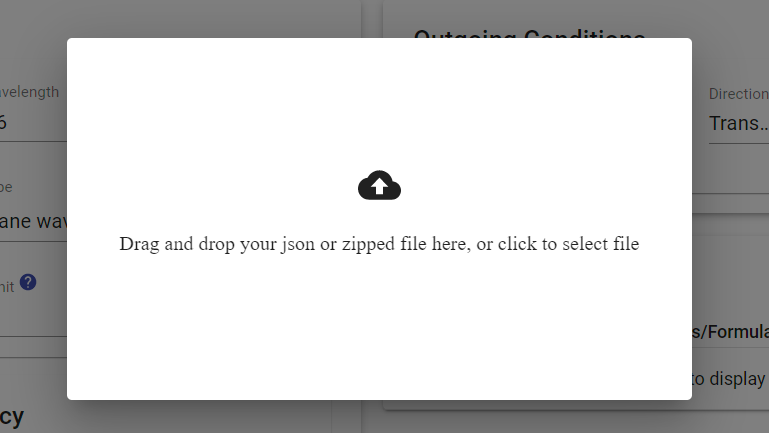
For choosing a particular wavefront target you can easily drag and drop your image file in json format in the above shown box that appears when you click on the import option. We are currently introducing new updates that can also import from a direct image file.
Currently, we have made 6.3mm*6.3mm size meta component with 13000 * 13000 meta cells within 20 min with a 4 CPU 32 GB ram version server. As seen the main limit is not the time but the memory which runs out generally. But we can scale up to cm size meta components simulation. Including segmentation and performing simulation for separate segments of very big size meta component can be a possible solution for tackling the memory issue assuming that the local approximation holds. For in-depth knowledge about the simulation time for different sizes of meta surface please contact us.
There is no limitation on the shape that is generated. However, the software contains several parameterized structures. Additionally, you can always import new structures with any shape. Practically the biggest limitation is the fact that not all shapes can be fabricated at the moment.
We use RCWA full-wave solver for our meta-cells and the creation of our meta-components is mainly done by brute force algorithms (there is scope for using some optimizing algorithms also).
We have tested various optimization algorithms and we can surely perform such optimizations based on the requests from the user. More information can be found in this video Link.
For our near-field wavefront approximation from the far-field, we use IIFTA (Iterative Inverse Fourier Transform Algorithm) which is generally very commonly used for such applications. We can provide other optimization which are currently not available through our software but are available through services.